
How to Adjust Screen Resolution
As a result of the amount of information presented on screen by SGJ Elect Success, a screen resolution of 1280 x 1024 pixels is recommended
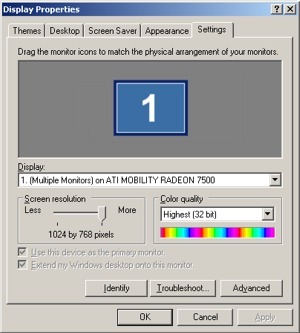
| To adjust the screen or
monitor resolution in Windows:
|
Figure 1 |

To adjust the
screen or monitor resolution on a Mac:
 |
On the Menu bar, select
Apple |
|
|
Click on Displays |
|
|
Under Resolutions, select 1280 x 1024(or highest resolution available) (Figure 3) |
|
|
For best results, select the highest frequency (Hz) and highest number of colors that your display adapter will support |
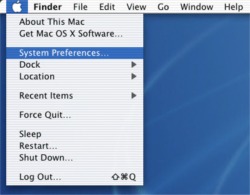
Figure 2 |
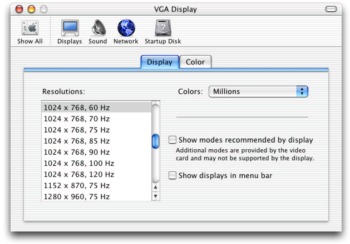 Figure 3 |
 System
Preferences... (Figure 2)
System
Preferences... (Figure 2)